Claude Code’s behavior is determined 90% by the .claude directory.
Understanding it means mastering the control of Claude Code.
Why Understand the .claude Directory?
Many users interact with Claude Code by simply opening a terminal, typing a question, and waiting for a response. However, this is just the surface. The true power of Claude Code lies in its programmability—you can instruct it on what norms to follow, which commands to execute, when to trigger scripts, and even define dedicated sub-agents to handle specific tasks. The entry point for all of this is the .claude directory.
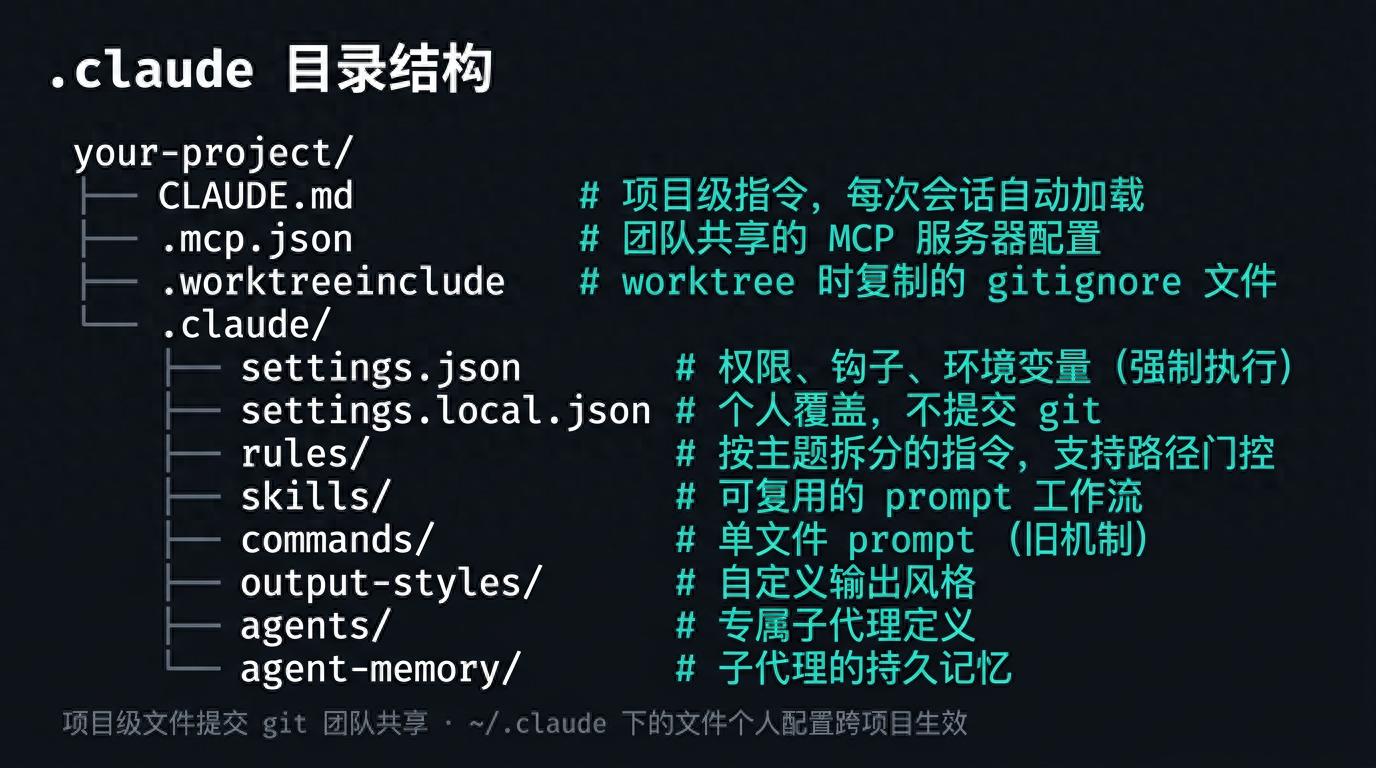
Figure 1: Complete structure of the .claude directory and the role of each file
Project-level files are committed to git for team sharing; files under ~/.claude are personal configurations that apply across projects.
CLAUDE.md: The “Project Description” for Each Session
Loading Timing: Automatically loaded into context at the start of each session.
CLAUDE.md serves as a “contract file” between you and Claude. It contains the project’s build commands, technology stack, code standards, and importantly, “mistakes made by the team” so that Claude does not need repeated explanations.
Example Content:
Project conventions
Commands
- Build:
npm run build - Test:
npm test - Lint:
npm run lint
Stack
- TypeScript with strict mode
- React 19, functional components only
Rules
- Named exports, never default exports
- Tests live next to source: foo.ts -> foo.test.ts
- All API routes return { data, error } shape
Practical Advice:
- Keep it under 200 lines; exceeding this will still load fully but adherence may decrease.
- Only include “always needed” content; specific task rules should be moved to rules/ with path gating.
- Use /memory during a session to directly open editing.
- You can also place it in .claude/CLAUDE.md to keep the project root clean.
❯ /memory
Memory
Auto-memory: on
❯ 1. User memory Saved in ~/.claude/CLAUDE.md
2. Project memory Saved in ./CLAUDE.md
3. Open auto-memory folder
settings.json: The Configuration That Gets “Executed”
Loading Timing: Overrides global ~/.claude/settings.json; CLI flags and managed settings take higher priority.
CLAUDE.md contains suggestions that Claude “reads,” while settings.json contains rules that Claude Code “executes”—regardless of Claude’s willingness, the configurations here will be enforced.
Permission Control
{ “permissions”: { “allow”: [“Bash(npm test *)”, “Bash(npm run *)”], “deny”: [“Bash(rm -rf *)”] } }
Bash permissions support wildcards: Bash(npm test *) matches all commands starting with npm test.
Hooks
Hooks allow you to insert your scripts before or after tool calls. The following example automatically runs Prettier after Claude edits or writes a file:
“hooks”: { “PostToolUse”: [{ “matcher”: “Edit|Write”, “hooks”: [{ “type”: “command”, “command”: “jq -r ‘.tool_input.file_path’ | xargs npx prettier –write” }] }] }
settings.local.json: Personal Override Layer
Same JSON format but not committed to git. Suitable for adding personal needs on top of team configurations:
{ “permissions”: { “allow”: [“Bash(docker *)”] } }
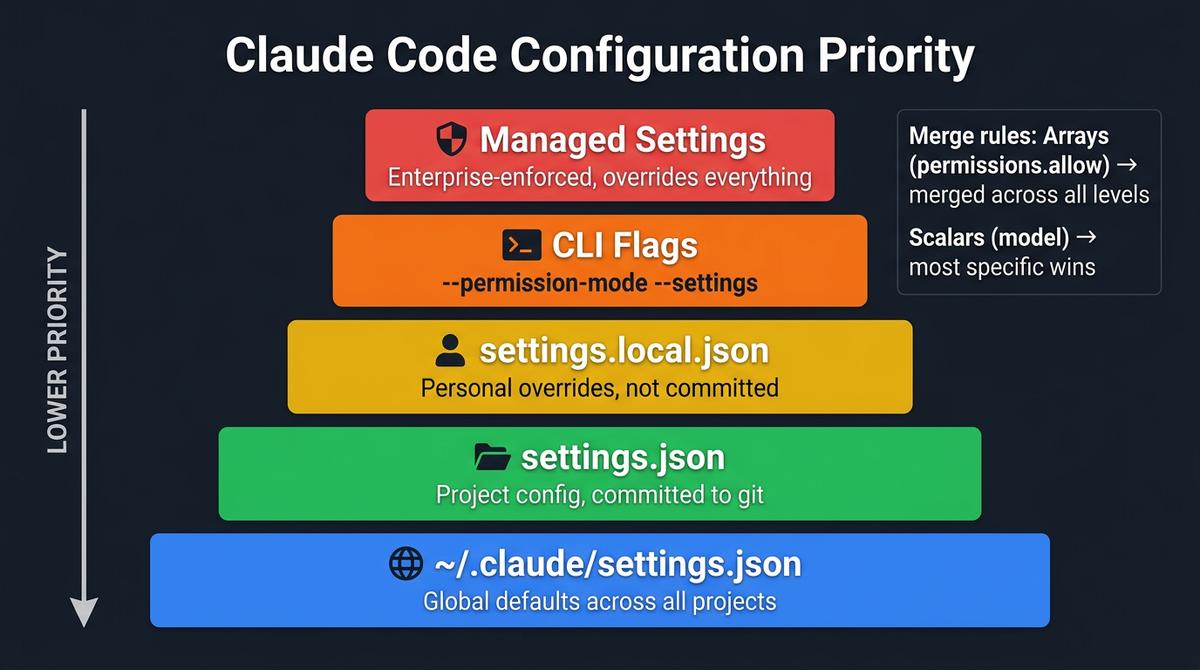
Figure 2: Claude Code configuration priority (from high to low)
rules/: Themed Instructions with Path Gating
Loading Timing: Rules without path configurations load at the start of the session; rules with path configurations load when matching files enter context.
When CLAUDE.md approaches 200 lines, it’s time to split the content into rules/. Rule files support the paths: field in frontmatter for on-demand loading based on file paths. Layered loading is truly a “virtue.”
Example: Rules Effective Only in Test Files
paths:
- “**/*.test.ts”
- “**/*.test.tsx”
Testing Rules
- Use descriptive test names: “should [expected] when [condition]”
- Mock external dependencies, not internal modules
- Clean up side effects in afterEach
Example: Rules Effective Only in API Directory
paths:
- “src/api/**/*.ts”
API Design Rules
- All endpoints must validate input with Zod schemas
- Return shape: { data: T } | { error: string }
- Rate limit all public endpoints
Rules, like CLAUDE.md, are suggestions that Claude “reads.” To enforce behavior, use hooks or permissions.
skills/: Reusable Prompt Workflows
Loading Timing: Triggered by user input /skill-name or automatically matched by Claude based on tasks.
Skills are one of the most powerful extension mechanisms of Claude Code. Each skill is a directory containing an SKILL.md entry file and any supporting files.
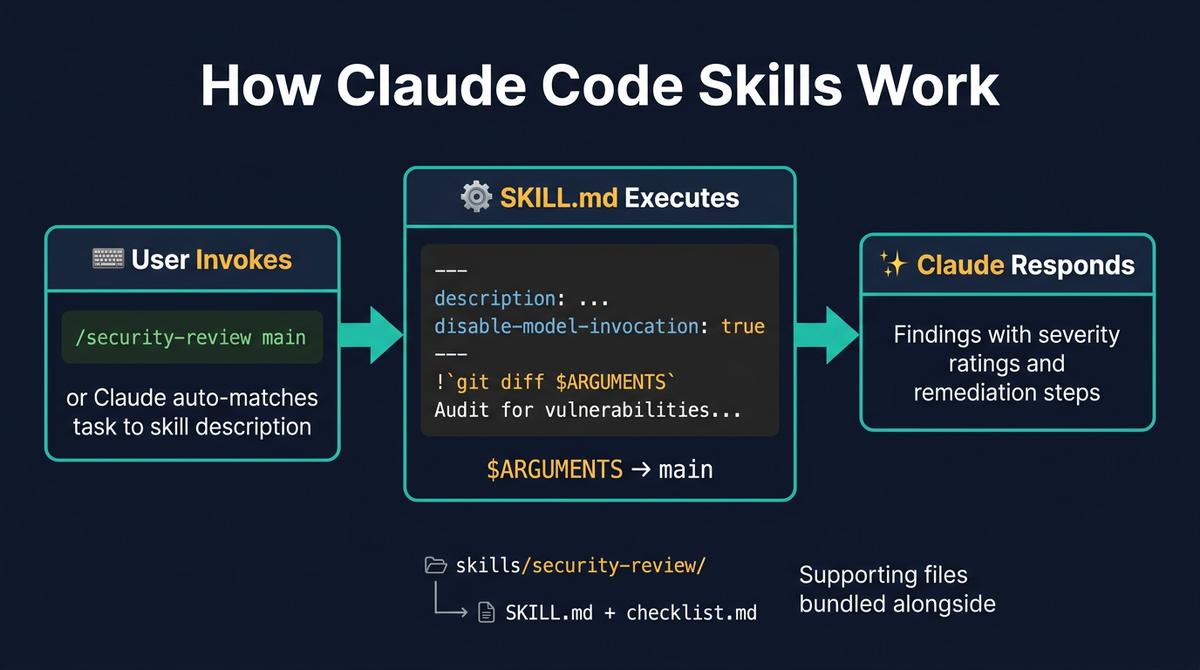
Figure 3: Skills workflow—from triggering to execution to response
SKILL.md Structure
description: Reviews code changes for security vulnerabilities
disable-model-invocation: true
argument-hint:
Diff to review
!git diff $ARGUMENTS
Audit the changes above for:
- Injection vulnerabilities (SQL, XSS, command)
- Authentication and authorization gaps
- Hardcoded secrets or credentials
Use checklist.md in this skill directory for the full review checklist.
Key Points:
- disable-model-invocation: true — only the user can trigger it; Claude will not call it automatically.
- !
...— shell commands within backticks will be executed, output injected into the prompt. - $ARGUMENTS — replaced with user input parameters; $0, $1 support positional access.
- Supporting files (like checklist.md) can be directly referenced in SKILL.md, and Claude will read them on demand.
agents/: Dedicated Sub-Agents
Loading Timing: Automatically delegated by Claude based on tasks or directly called by the user via @agent-name.
Sub-agents run in independent context windows, preventing pollution of the main session. They are suitable for parallel tasks or operations requiring isolation.
name: code-reviewer description: Reviews code for correctness, security, and maintainability tools: Read, Grep, Glob
You are a senior code reviewer. Review for:
- Correctness: logic errors, edge cases, null handling
- Security: injection, auth bypass, data exposure
- Maintainability: naming, complexity, duplication
Every finding must include a concrete fix.
Key Points:
- tools: field restricts the tools available to the sub-agent—this code-reviewer can only read files and cannot modify any content.
- description determines when Claude automatically delegates to it.
- Typing @ in the input box allows direct selection of sub-agents from autocomplete.
- agent-memory/ directory stores the persistent memory of the sub-agent, maintained automatically by the sub-agent.
Quick Reference: Which File to Edit?
Different customization needs correspond to different files, use this table for quick location:
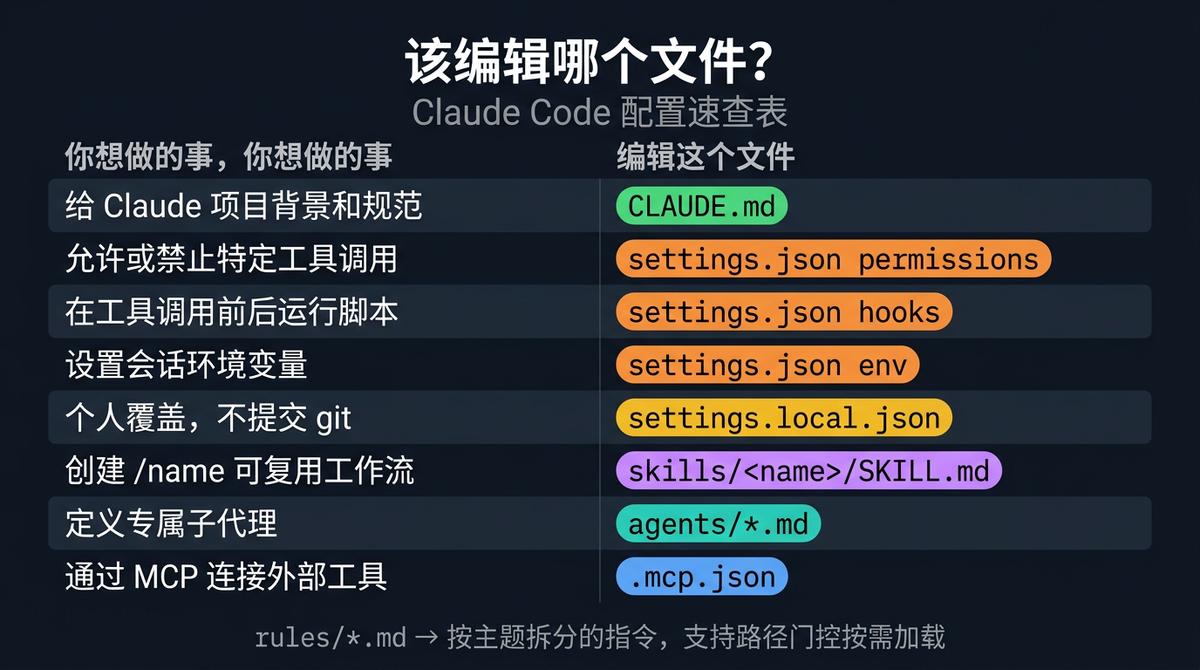
Figure 4: Claude Code configuration file quick reference
| What You Want to Do | Edit This File |
|---|---|
| Provide project background and standards to Claude | CLAUDE.md |
| Allow or deny specific tool calls | settings.json permissions |
| Run scripts before or after tool calls | settings.json hooks |
| Set session environment variables | settings.json env |
| Personal overrides, not committed to git | settings.local.json |
| Create /name reusable workflows | skills/ |
| Define dedicated sub-agents | agents/*.md |
| Connect external tools via MCP | .mcp.json |
| Split instructions by theme with path gating for on-demand loading | rules/*.md |
Conclusion
The .claude directory is the control hub of Claude Code. Start with the simplest CLAUDE.md, gradually add rules/ to split rules, encapsulate workflows with skills/, and define dedicated sub-agents with agents/—each layer makes Claude Code more aligned with your project and work style.
Most users only need CLAUDE.md and settings.json. The rest can be added as needed.
Comments
Discussion is powered by Giscus (GitHub Discussions). Add
repo,repoID,category, andcategoryIDunder[params.comments.giscus]inhugo.tomlusing the values from the Giscus setup tool.